Open your file — or describe the part you need
Drag in a STEP, STL, IGES, OBJ, DXF, BREP, or GLB file to view it in 3D — free, no signup to look. No file yet? Describe your part in Studio →
Bill of Materials Example: A Multi-Level BOM From a Real Drawing
A bill of materials (BOM) lists every part in a product with its quantity, part number, material and weight. This example builds one from a real assembly drawing, a split pillow block with three made parts and three bought ones. You can download it as Excel or CSV and use it as a template.
What is a bill of materials?
A bill of materials is the list of everything that goes into one product: each part, sub-assembly and bought item, with how many are used. Purchasing orders from it, manufacturing builds from it, and engineering uses it for cost, weight and material reports.
A BOM starts from the drawings. The assembly drawing’s parts list names the items and quantities, and each part’s detail drawing gives its material. The guide to assembly drawings shows how the parts list and balloons work.
What does a bill of materials example look like?
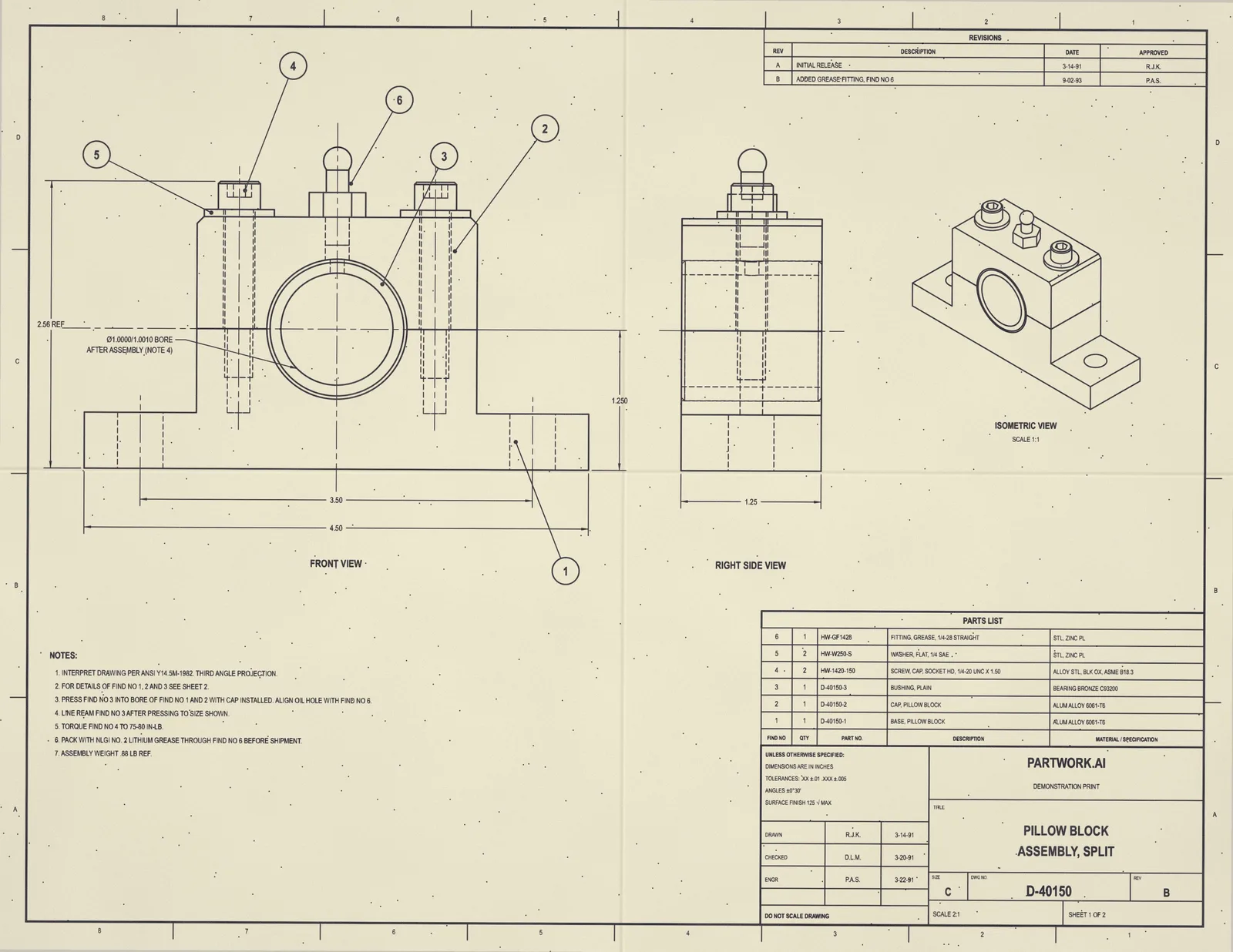
Here is a real one. Drawing D-40150 is a split pillow block: an aluminium base and cap, a bronze bushing, two cap screws, two washers and a grease fitting. Its BOM has one row for the assembly and one for each of the six items, with three weights left open.
| Level | Find | Part number | Description | Qty | Make / Buy | Material | Ext weight (kg) | Weight source | Process |
|---|---|---|---|---|---|---|---|---|---|
| 0 | D-40150 | PILLOW BLOCK ASSEMBLY, SPLIT | 1 | Make | 0.364 | Roll-up (incomplete) | Assembly | ||
| 1 | 1 | D-40150-1 | BASE, PILLOW BLOCK | 1 | Make | ALUM ALLOY 6061-T6 | 0.186 | Model volume x typical density | CNC machining |
| 1 | 2 | D-40150-2 | CAP, PILLOW BLOCK | 1 | Make | ALUM ALLOY 6061-T6 | 0.098 | Model volume x typical density | CNC machining |
| 1 | 3 | D-40150-3 | BUSHING, PLAIN | 1 | Make | BEARING BRONZE C93200 | 0.080 | Model volume x typical density | CNC turning |
| 1 | 4 | HW-1420-150 | SCREW, CAP, SOCKET HD, 1/4-20 UNC X 1.50 | 2 | Buy | ALLOY STL, BLK OX, ASME B18.3 | — | Missing | Purchased |
| 1 | 5 | HW-W250-S | WASHER, FLAT, 1/4 SAE | 2 | Buy | STL, ZINC PL | — | Missing | Purchased |
| 1 | 6 | HW-GF1428 | FITTING, GREASE, 1/4-28 STRAIGHT | 1 | Buy | STL, ZINC PL | — | Missing | Purchased |
Download the example: BOM (Excel) · BOM (CSV) · Drawing (PDF, 2 sheets)
The Excel file has four sheets: a summary with the total weight and what each weight source means, the BOM itself with outline buttons to fold the levels, a roll-up of weight by material, and the open items with what each one needs. Delete the rows and keep the columns, and it is a template for your own product.
What columns should a bill of materials have?
At least a level, part number, description, quantity and unit. A useful engineering BOM adds the find number from the drawing, the revision, make or buy, material, unit and extended weight, where each weight came from, and the likely manufacturing process.
| Column | What it holds |
|---|---|
| Level | 0 for the top assembly, 1 for what goes straight into it, 2 for the parts of a sub-assembly, and so on |
| Find number | The balloon number on the assembly drawing, so a row can be found on the sheet |
| Part number | The drawing number for a made part, or the catalogue number for a bought one |
| Description | A short name, noun first, such as "SCREW, CAP, SOCKET HD" |
| Revision | The revision of that part’s drawing the BOM was built from |
| Quantity per parent | How many go into one of the row above it, not into the whole product |
| Make or buy | Whether the part is made to its drawing or bought to a catalogue number |
| Material | The material as the drawing prints it, such as "ALUM ALLOY 6061-T6" |
| Unit and extended weight | One part’s weight, and that weight times the total quantity |
| Weight source | Where the weight came from, so the reader knows how far to trust it |
| Process | How a made part is likely produced, such as CNC machining or casting |
Write descriptions noun first, the way the drawing does: “SCREW, CAP, SOCKET HD” sorts next to every other screw, where “socket head cap screw” would not. Keep the material exactly as printed, since it is what the shop will order.
What is a multi-level (indented) BOM?
A multi-level BOM keeps sub-assemblies as their own rows, with their parts listed under them one level down. Laid out with each row indented by its level, it is called an indented BOM. A single-level BOM lists only what goes straight into one assembly.
The pillow block on its own has two levels: the assembly, and the six items in it. Put two of them into a conveyor and the BOM gains a level, and quantities start to multiply. This short illustration shows the idea:
| Level | Part number | Description | Qty per parent | Total qty |
|---|---|---|---|---|
| 0 | CV-200 | Conveyor idler end | 1 | 1 |
| 1 | D-40150 | Pillow block assembly | 2 | 2 |
| 2 | D-40150-1 | Base | 1 | 2 |
| 2 | D-40150-3 | Bushing | 1 | 2 |
| 2 | HW-1420-150 | Cap screw, 1/4-20 | 2 | 4 |
| 1 | SH-0120 | Idler shaft | 1 | 1 |
Quantity per parent is per one of the row above. The conveyor uses two pillow blocks, each with two cap screws, so the total is four. Always order from the total quantity, never from the quantity per parent.
Where do the weights in a BOM come from?
For a made part, from its volume times its material’s density: the 3D model gives the volume and the drawing gives the material. Bought parts take a catalogue or datasheet weight. An assembly’s weight is the sum of its parts’ weights times their quantities.
- Measured. The base is 69.0 cm³ of 6061 aluminium at 2.70 g/cm³, so 0.186 kg. A typical density is within about 1–3% of a specific grade.
- Published density. When the drawing names an exact grade the typical table lacks, the same volume times that grade’s published density.
- Catalogue or datasheet. For a bought part with no geometry, such as a motor or a label, the supplier’s weight.
- Missing. When there is no reliable source, the row says so. The example’s screws, washers and fitting say only “STL”, no grade, so they stay open until a catalogue weight is added. A blank is better than a guessed number.
The made parts add up to 0.364 kg. The drawing’s note gives the whole assembly as 0.88 lb, or 0.399 kg, so the five open hardware items weigh about 35 g together. Naming each weight’s source is what lets you make that check.
What is the difference between an EBOM and an MBOM?
An engineering BOM (EBOM) follows the design: the assemblies and parts as the drawings show them. A manufacturing BOM (MBOM) follows the build: the same parts regrouped by how the factory puts them together, plus grease, adhesive, packaging and other items no drawing shows.
| EBOM | MBOM | |
|---|---|---|
| Made by | Design engineering | Manufacturing engineering |
| Built from | The drawings and the 3D model | The EBOM plus how the factory builds it |
| Structure | Follows the design: assemblies as drawn | Follows the build: work stations and kits |
| Extra rows | Only what the drawing lists | Grease, adhesive, packaging, labels, process materials |
| Used for | Design release, costing, weight and material reports | Ordering, scheduling and building |
The example is an EBOM. Its notes call for lithium grease through the fitting before shipping, but its parts list has no row for it; an MBOM would add the grease as a row, with the amount per unit.
How do you make a BOM from a drawing?
Copy the parts list row by row, then fill in each part’s material from its detail drawing and its weight from a 3D model. Without a model, weights have to be worked out by hand from the dimensions, which is slow for anything but simple blocks and tubes.
- Rows. One per parts list item, with its find number, part number, description and quantity.
- Levels. A row that has its own assembly drawing is a sub-assembly; its parts go one level under it.
- Make or buy. A part with a detail drawing is made; a catalogue number is bought.
- Material. From the parts list or the part’s title block, exactly as printed.
- Weight. Volume from the 3D model times density, or the catalogue weight for a bought part.
- Check. Compare the total with any weight printed on the drawing.
Frequently asked questions
What is a bill of materials?
A bill of materials, or BOM, is the list of every part, sub-assembly and material that goes into one product, with the quantity of each. It usually adds part numbers, descriptions, materials and weights, and it is the list purchasing orders from and manufacturing builds from.
What is the difference between a BOM and a parts list?
A parts list is printed on an assembly drawing and covers that one drawing’s items. A BOM covers the whole product across every level, often with weights, make or buy, cost and process added. On a small assembly the two can hold the same rows.
What is an indented BOM?
An indented BOM is a multi-level BOM laid out as a list in which each row is indented by its level, so a sub-assembly’s parts sit under it. It reads like an outline of the product and is the usual way ERP and PLM systems print a multi-level BOM.
How do you calculate the weight of a part for a BOM?
Multiply the part’s volume by its material’s density: a 3D model gives the volume, and the drawing gives the material. Aluminium 6061 is about 2.70 g/cm³, so a 69 cm³ part weighs about 186 g. Bought parts take the catalogue or datasheet weight.
Is there a free bill of materials template?
Yes. The example BOM on this page is a free Excel and CSV download with every column in use for a real assembly. Delete the rows and keep the columns, and it works as a template for your own.
Can a BOM be made from a drawing?
Yes, when the drawing has a parts list and every made part is dimensioned. The parts list gives the rows, part numbers, quantities and materials; a 3D model built from the drawing gives each part’s volume, and so its weight.
Have a drawing and need its BOM?
Upload it to Drawing to STEP from PartWork.ai. Every new conversion comes with a STEP, an STL and a BOM in the same format, in Excel and CSV, from $29.99. Material, weight and a suggested process are filled in where the drawing and model give them.
- Any print. A PDF, PNG or JPG, from CAD, a scanner or a phone photo, including old hand-drawn sheets.
- Single parts and assemblies. An assembly gets a multi-level BOM, as long as every made part is dimensioned.
- Priced up front. A free check of the drawing sets the price before you pay.
Export-controlled drawings (ITAR/EAR) aren’t accepted.