Meet Cass
Your AI-Powered CAD Designer
No human required
Cass has an email. Send her the work the way you’d send it to a person. She reads the print, builds the model, checks every feature against the drawing, and writes back with the files. You pay for the hours she works, and you can read what each one did.
- By email
- Hourly journal
- Live view
- Weekly report
- No CAD software
- No app to install
- Just email Cass
- From
- Dana Ortiz <dana@northfieldfab.com>
- To
- cass@northfield-fab.partwork.ai
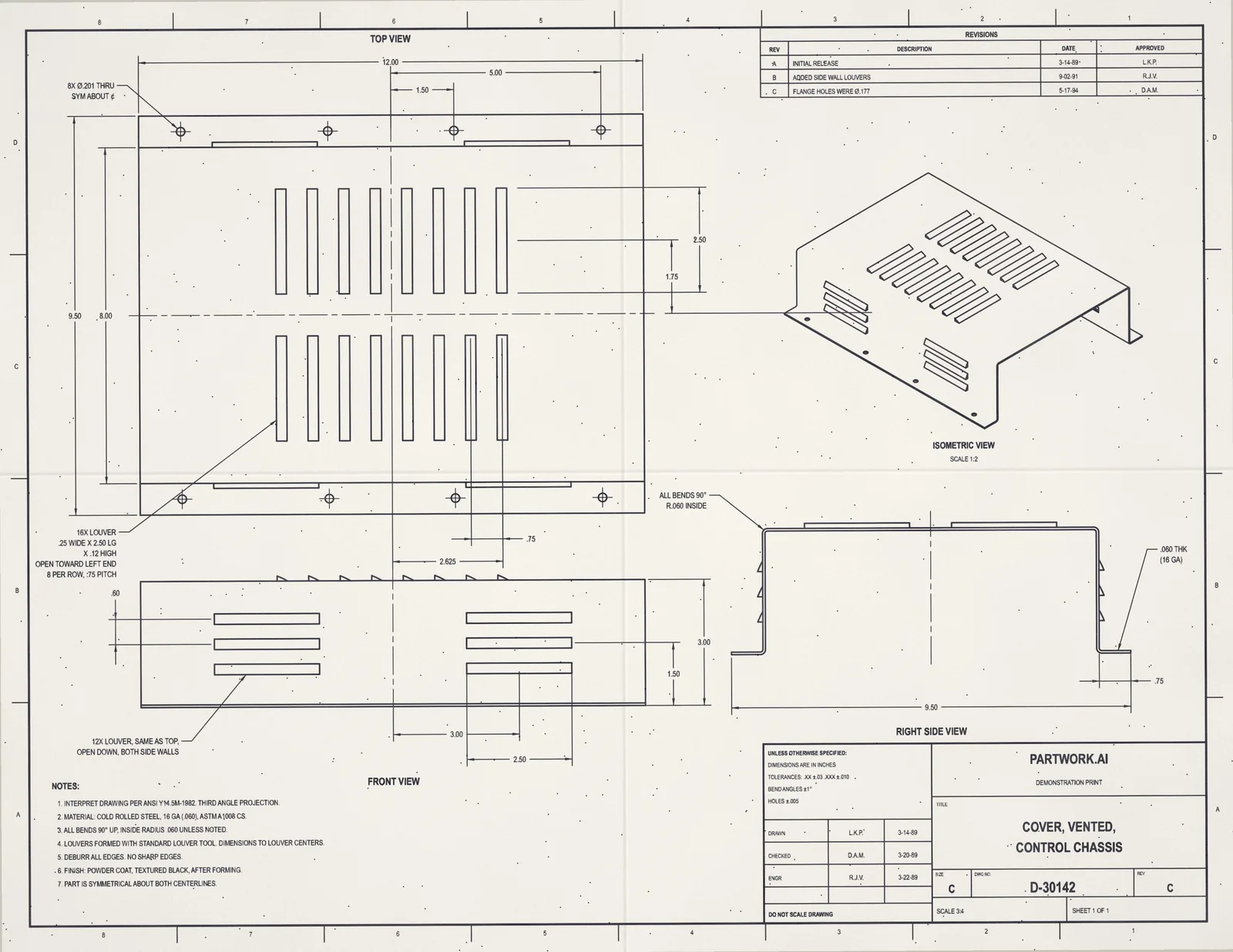
Cass, customer print attached. Need a STEP of the formed part for the quote. Louvers on the top face, 16 ga.
D-30142-revC.pdfRead it: 14 dimensions, 3 views, 2 notes. One question before I cut the holes: the side view shows 8 of the Ø.201 holes and the flat-pattern note says 12. Which is it?
Forming the sheet and louvers now. The clock stops while I wait on you.
A CAD designer does three things.
Takes the brief, does the work, checks and delivers it. Cass does all three, and shows her work.
Takes the brief
A customer print, a markup on a part, a change request in an email, a model that needs a new revision. She reads it, and asks when something is missing or ambiguous rather than guessing.
Does the CAD work
Builds a new model from a drawing, changes one you already have, cuts the next revision. Real solids any CAD package opens, feature by feature, in the order a designer would.
Checks and delivers
Compares the result with the drawing or your request, lists every mismatch, and sends the STEP, STL and report back in the thread, with the revision history kept.
That was the part of the job you paid for by the hour. It no longer needs a person. We’re not saying a human never touches CAD again. We’re saying the next designer you hire should be Cass.
Sign up. Then it’s all email.
- 1
Sign up
A short form: your email and your shop. Cass gets an address at your shop, like cass@acme-machine.partwork.ai.
- 2
Email her the work
A drawing to convert, a model to change, a part to revise. Attach the files and write it the way you’d brief a colleague.
- 3
Every thread is a job
Each conversation becomes its own work item with its own clock. Reply in the thread to steer it or add to it.
- 4
Watch her work
Open the live view from any reply and see the model being built and checked against the drawing.
- 5
Read the journal
Every hour Cass works gets a written summary of what was done. The invoice is that journal, priced by the quarter hour.
- 6
Get the weekly report
Every week Cass emails what she worked on: each job, what was done, what she is waiting on, and the hours.
This is Cass building a sheet metal part.
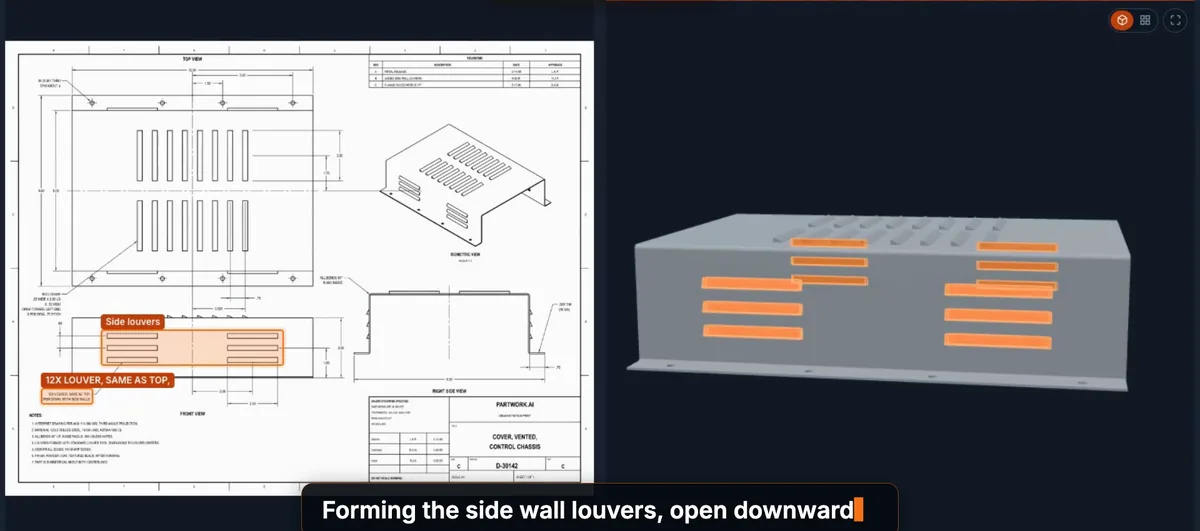
Recorded from the live view: the print read, the sheet formed, the holes and louvers cut, each one checked against the drawing as it appears.
The whole job, not just the drawing.
Brief her the way you’d brief a colleague: attach the files, say what you need, reply when she asks.
Drawings to models
Paper, PDF or photo in. A real solid out.
- Model a part from a PDF, scan or photo of its drawing
- Redraw legacy prints into clean CAD
- Flat patterns for the laser, with your bend deductions
- 2D drawings made from your models
Changes and revisions
Redlines in. A checked revision out.
- Change a model you send, or one she built
- Revision tables and change notes
- Make an old STEP or STL of a machined part editable again
- Every change measured, and everything else left as it was
Checks and reviews
A second pair of eyes on every model and drawing.
- Check a model against its drawing
- Compare two revisions and list what moved
- Manufacturability reviews for your process
- Tolerance stack-ups along one direction
Assemblies
Parts that fit together, on paper and in the model.
- Assemble parts, check for interference, explode the views
- Assembly drawings
- Parts lists with your part numbers
- Standard hardware built to the published standards
Engineering help
Answers with the measurements behind them.
- Volume, weight, fit, the thinnest wall: ask about any model
- Design from a brief, with a concept for you to approve first
- Material and hardware suggestions, with the hand calculations shown
Files and standards
Your formats, your title block, your naming.
- STEP, STL or IGES, in inches or millimetres
- Your title block, drawing template and file naming
- Every file kept and filed by job and revision
- Scans
- Photos
- STEP
- IGES
- STL
- OBJ
- 3MF
- DXF
- ZIP
Native CAD files? Send a STEP export and she takes it from there.
You always know what Cass is doing.
A designer you can watch, read and audit is a designer you don’t have to chase.
Live View
 Live
Every job streams as it runs: the model taking shape, each feature ringed on the drawing as it appears, the questions Cass is waiting on. Open it from any reply.
Journal
Each hour Cass works gets a written summary: what was read, built, checked and found. The invoice is the journal, priced by the quarter hour.
Weekly Report
Vented cover rev C sent Tue · Bracket rev D sent Tue · Housing waiting on the section view since Tue
One email a week from Cass: each job, what was done, what she is waiting on from you, and the hours.
Less than a drafter’s wage. Only for the hours worked.
Less than a drafter’s hourly wage, and that is before the salary, benefits and seat a drafter comes with. Only the time spent building and checking your parts counts. Reading your email, asking a question and sending files are free.
- No retainer, no minimum
- No seat licence, no onboarding
- Nothing billed while Cass waits on you
- Invoice built from the journal
A sample week’s journal
What the invoice is made of: one line per hour worked, the time to the nearest quarter hour.
| When | What was done | Hours |
|---|---|---|
| Tue 09:00 | Vented cover rev C. Read the print (14 dimensions, 3 views, 2 notes), asked about one hole count, formed the sheet with 4 flanges, cut 12 holes and 2 louver banks, checked 14 of 14 against the drawing, sent STEP, STL and the report. | 0.50 |
| Tue 14:00 | Bracket rev D. Moved the slot per your markup, thickened the gusset, re-checked every dimension, sent the revised model in the thread. | 0.25 |
| Thu 11:00 | Housing. Waiting on the missing section view since Tuesday. Nothing built, nothing billed. | 0.00 |
| Billed this week | 0.75 |
The designer on payroll, and Cass
Frequently asked questions
Is there a person behind the email address?
No. Cass is AI. She reads your email and your files, builds and checks the model, and writes back herself. When she is unsure she asks you rather than guessing, and when she can’t do a job she says so in her first reply, with nothing billed.
What does it cost?
$29 an hour, billed by the quarter hour, for the time Cass spends building and checking your parts. That is less than a drafter’s hourly wage, with no salary, benefits or seat licence on top, and no retainer or minimum. Reading your email, asking a question and sending a file are free.
How do I know the hours are real?
Every hour Cass works gets a summary in her journal: what was read, what was built, what was checked and what she found, with the time billed to the nearest quarter hour. The invoice is that journal priced, so you can read what each line paid for, and query any of it.
Does Cass report back?
Every week Cass emails a status report: each job she worked on, what was done, what she is waiting on from you, and the hours billed. The month’s invoice is those reports added up.
What can I send Cass?
Drawings as PDFs, scans or photos; models as STEP, IGES, STL, OBJ or 3MF; DXF files; markups; or a ZIP of any of these. For a native CAD file, send a STEP export and she takes it from there. Machined parts, castings, sheet metal and assemblies are all in scope.
What can’t Cass do?
Anything that needs hands or a stamp. She can’t measure a physical part, so send measurements or photos with a scale. She doesn’t join live meetings; she answers review notes by email. She doesn’t sign off designs as a licensed engineer. Very freeform, sculpted surfaces are out of reach too. When a request is beyond her, she says so in her first reply, with nothing billed.
Who owns the files?
You do. Your drawings and models are never used to train AI, and no person outside your shop sees them. You can ask for a thread’s files to be deleted at any time.
Why an email address and not an app?
Because that is how work reaches a designer today. Forward a customer’s drawing, cc Cass on a thread, reply with a change. Nothing to install and nothing new to learn.
Hire Cass
Your email and your shop. We’ll write when Cass is ready for you.
Need one part done today? Upload a drawing →